8.10. Mars Express High Resolution Stereo Camera (HRSC)
The HRSC camera on the Mars Express satellite is a complicated system, consisting of multiple channels pointed in different directions plus another super resolution channel. The best option to create DEMs is to use the two dedicated stereo channels. These are pointed ahead of and behind the nadir channel and collect a stereo observation in a single pass of the satellite.
Since each observation contains both stereo channels, one observation is sufficient to create a DEM.
Note
This example requires ASP 3.7.0 or later, installed via conda with the
custom-built ISIS 10 packages (Section 2.2). Those ship the ALE and
ISIS fixes needed for HRSC. The stereo workflow below is validated by an
automated regression test.
Data can be downloaded from the HRSC node in the Planetary Data System (PDS).
HRSC data is organized into categories. Level 2 is radiometrically corrected, level 3 is corrected and mapprojected onto MOLA, and level 4 is corrected and mapprojected on to a DEM created from the HRSC data. You should use the level 2 data for creating DEMs with ASP. If you would like to download one of the already created DEMs, it may be easiest to use the areoid referenced version (.da4 extension) since that is consistent with MOLA.
8.10.1. Preparing the data
Fetch the two stereo channels using wget from:
https://pds-geosciences.wustl.edu/mex/mex-m-hrsc-3-rdr-v4/mexhrs_4000/data/1995/h1995_0000_s13.img
https://pds-geosciences.wustl.edu/mex/mex-m-hrsc-3-rdr-v4/mexhrs_4000/data/1995/h1995_0000_s23.img
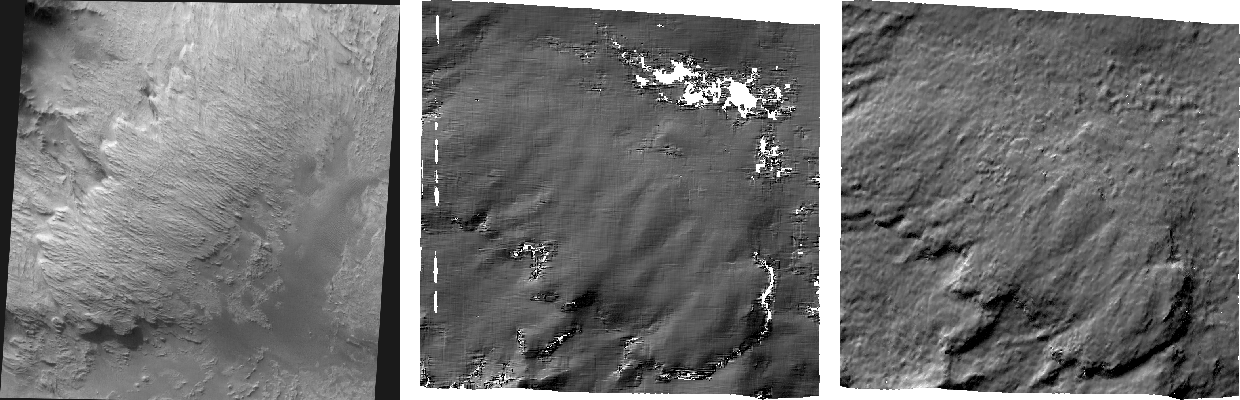
Fig. 8.12 Sample outputs from a cropped region of HRSC frame 1995. Left: Cropped input. Center: Block matching with subpixel mode 3. Right: MGM algorithm with cost mode 3.
See Section 2.3.1 for how to set up ISIS and download the needed
kernels. For HRSC, they are part of the mex dataset.
Run:
hrsc2isis from=h1995_0000_s13.img to=h1995_0000_s13.cub
hrsc2isis from=h1995_0000_s23.img to=h1995_0000_s23.cub
spiceinit from=h1995_0000_s13.cub ckpredicted=true
spiceinit from=h1995_0000_s23.cub ckpredicted=true
For ISIS prior to version 8.3.0, hrsc2isis cannot read the level 3 images
served by PDS. If ingestion fails, edit the .img files to change the level from
3 to 2, then rerun hrsc2isis:
perl -pi -e 's#(PROCESSING_LEVEL_ID\s+=) 3#$1 2#g' *.img
Here we added the ckpredicted=true flag to spiceinit. Adding
web=true can help avoid downloading the kernels, if this works. See the
(spiceinit documentation).
8.10.2. Running stereo
Consider running bundle adjustment before stereo (Section 16.5). This is not done here.
HRSC images are large and may have compression artifacts. It is suggested to
experiment running stereo on a small region with stereo_gui
(Section 16.73). Invoke it as follows:
stereo_gui                              \
  h1995_0000_s13.cub h1995_0000_s23.cub \
  --stereo-algorithm asp_mgm            \
  --cost-mode 3                         \
  mgm/out
Then select a clip in each image in the GUI, and run parallel_stereo from
the menu. The clips should be reasonably large, overlap well, and have notable
texture, to ensure enough interest point matches are found.
To run on the full images, replace stereo_gui with parallel_stereo in
the command above.
See Section 6 for other stereo algorithms, and information on tradeoffs between them.
A DEM is created with point2dem (Section 16.57):
point2dem                            \
  --stereographic --auto-proj-center \
  mgm/out-PC.tif
Alignment to MOLA can be done with pc_align (Section 16.54). See
Section 19.12.4 for how to download MOLA and the --csv-format to use.
8.10.3. CSM cameras
To create CSM cameras (Section 8.12) for HRSC, the ASP custom build of ALE is
required, to avoid a bug in the official ALE. As of ASP 3.7.0, this custom ALE
is already included in the ASP conda environment (Section 2.2), so
no separate environment is needed. Once a higher version of ALE is officially
released, the stock one will likely work as well.
Point ISISDATA at the ISIS data directory (Section 2.3.1):
export ISISDATA=/path/to/isisdata
Create an ISD for each stereo channel. The -k option tells isd_generate
which cube’s attached SPICE kernels to use; here each cube supplies its own,
set earlier by spiceinit:
isd_generate -k h1995_0000_s13.cub h1995_0000_s13.cub
isd_generate -k h1995_0000_s23.cub h1995_0000_s23.cub
This writes h1995_0000_s13.json and h1995_0000_s23.json. Each .json
is the CSM camera for the corresponding .cub image.
Then, stereo processing can happen as in Section 8.12.2.2.