16.67. sfs
The sfs tool can add more detail to a DEM using shape-from-shading
([AB18]). The parallel_sfs program
(Section 16.50) extends sfs to run using multiple
processes on multiple machines.
An overview and examples of using this program are in Section 11.1.
16.67.1. Illustration
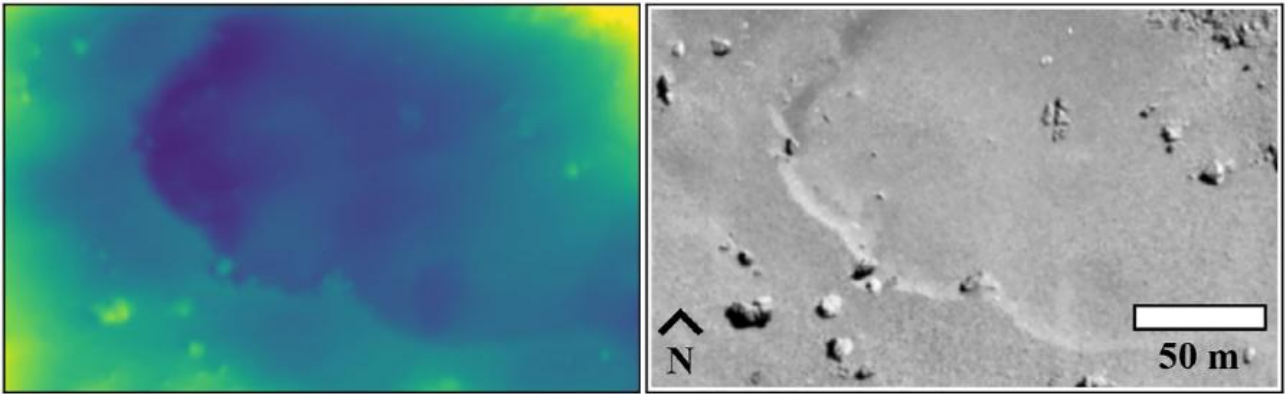
Fig. 16.33 Refining the surface of Comet 67P with shape-from-shading ([JBH+24]). Left: produced terrain. Right: input image.
16.67.2. Usage
sfs -i <input DEM> -n <max iterations> -o <output prefix> \
  [other options] <images> <cameras>
The tool outputs at each iteration the current DEM and other auxiliary and appropriately-named datasets, which are documented further down.
16.67.3. Example
sfs --max-iterations 5 --use-approx-camera-models    \
  --crop-input-images --bundle-adjust-prefix ba/run  \
   -i input_dem.tif image1.cub image2.cub -o run/run
See many detailed worked-out examples in Section 11.1, including for the Moon and Earth.
16.67.4. Inputs
The SfS program takes as input a DEM to refine, images, cameras
(contained within the .cub image files for ISIS data), Sun positions
(normally embedded in the cameras), and (optionally but strongly
suggested) camera adjustments, which makes sure the images are
registered to each other and to the ground (the detailed examples in
Section 11.1 discuss this).
16.67.5. Outputs
The sfs outputs are saved at the location given by the output prefix (option
-o). If that is set to run/run as in the example above, the following
outputs are produced.
run/run-DEM-final.tifThe produced SfS DEM.
run/run-exposures.txtThe computed exposures for the images. These can be passed back to
sfsvia--image-exposures-prefix.
run/run-haze.txtThe computed haze values for the images. These can be passed back to
sfsvia--haze-prefix. Only created if--num-haze-coeffsis positive.
run-albedo-estim.tifThe estimated initial albedo (if
--float-albedois on). It is produced by sampling the DEM with option--num-samples-for-estim, then interpolated to all DEM pixels. Can be passed tosfsvia--input-albedo. Normallyparallel_sfstakes care of the initial estimation and passing this along.
run/run-albedo-final.tifThe computed albedo. All its values are 1 unless the option
--float-albedois used.
run/run-<image>-final-meas-intensity.tifFor each input image, this has the actual (measured) image values at each refined DEM grid point. See also
--save-meas-intensity-only.
run/run-<image>-final-sim-intensity.tifFor each input image, this has the simulated image values at each refined DEM grid point using the reflectance model and the Sun position for the current image. If the modeling is perfect, the measured input image will precisely agree with the simulated (modeled) image. In reality these are close but different. This was called the “computed” intensity prior to build 2025/11. See also
--save-sim-intensity-only.
run/run-DEM-variance.tifIf
--save-varianceswas set, this file stores the uncalibrated variance for each DEM pixel. If--float-albedois also on, the albedo variance is stored in<output prefix>-albedo-variance.tif. Values within 3 pixels of the boundary are set to nodata. See Section 11.10.21.
run/run-DEM-{left,right,top,bottom}-covariance.tifIf
--save-covarianceswas set, the “-dr1_dcn1” file stores the uncalibrated covariance of each DEM pixel with its top-left neighbor (“+1” row and “-1” column away). If--float-albedois also on, the albedo covariances with analogous names are saved as well. Values within 3 pixels of the boundary are set to nodata. See Section 11.10.21.
In addition, SfS saves intermediate values of many of these quantities
at each iteration, unless the flag --save-sparingly is used. SfS
may also save the “haze” values if this is solved for (see the
appropriate options below and Section 11.4).
16.67.6. Command-line options for sfs
- -i, --input-dem <filename>
The input DEM to refine using SfS.
- --image-list
A file containing the list of images, when they are too many to specify on the command line. Use space or newline as separator. See also
--camera-list.- --camera-list
A file containing the list of cameras, when they are too many to specify on the command line. If the images have embedded camera information, such as for ISIS, this file must be empty but must be specified if
--image-listis specified.- -o, --output-prefix <string>
Prefix for output filenames.
- -n, --max-iterations <integer (default: 10)>
Set the maximum number of iterations. Normally 5-10 iterations is enough, even when convergence is not reached, as the solution usually improves quickly at first and only very fine refinements happen later.
- --reflectance-type <integer (default: 1)>
Reflectance types: 0. Lambertian 1. Lunar-Lambert 2. Hapke 3. Experimental extension of Lunar-Lambert 4. Charon model (a variation of Lunar-Lambert).
- --smoothness-weight <float (default: 0.04)>
The weight given to the cost function term which consists of sums of squares of second-order derivatives. A larger value will result in a smoother solution with fewer artifacts. The range can be in 0.01 – 10,000. A discussion of this term is in [LSAM21]. See also
--gradient-weight.- --initial-dem-constraint-weight <float (default: 0)>
A larger value will try harder to keep the SfS-optimized DEM closer to the initial guess DEM. A value between 0.0001 and 0.001 may work, unless your initial DEM is very unreliable.
- --albedo-constraint-weight <float (default: 0)>
If floating the albedo, a larger value will try harder to keep the optimized albedo close to the initial albedo. See also:
--input-albedoand--albedo-robust-threshold. In build 2025/11 and later, this is also used in estimating the initial low-resolution albedo (option--estimate-exposure-haze-albedo).- --albedo-robust-threshold <float (default: 0)>
If floating the albedo and this threshold is positive, apply a Cauchy loss with this threshold to the product of the albedo difference and the albedo constraint weight. In build 2025/11 and later, this is also used in estimating the initial low-resolution albedo (option
--estimate-exposure-haze-albedo).- --bundle-adjust-prefix <path>
Use the camera adjustments obtained by previously running bundle_adjust with this output prefix.
- --float-albedo
Float the albedo for each pixel. Will give incorrect results if only one image is present. The albedo is normalized, its nominal value is 1.
- --float-exposure
Float the exposure for each image. Will give incorrect results if only one image is present. It usually gives marginal results.
- --shadow-threshold <arg>
A shadow threshold to apply to all images. Must be positive. Areas that are in shadow in all images will result in a blurred version of the input DEM, influenced by the
--smoothness-weight.- --shadow-thresholds <arg>
Optional shadow thresholds for the input images (a list of real values in quotes, one per image). See also
--shadow-threshold.- --custom-shadow-threshold-list <arg>
A list having one image and one shadow threshold per line. For the images specified there, override the shadow threshold supplied by other means with this value.
- --robust-threshold <arg>
If positive, set the threshold for the robust measured-to-simulated intensity difference (using the Cauchy loss). Any difference much larger than this will be penalized. A good value may be 5% to 25% of the average image value or the same fraction of the computed image exposure values.
- --estimate-height-errors
Estimate the SfS DEM height uncertainty (in meters). This option is obsolete. Use
--save-variancesinstead (Section 11.10.21). This older implementation works by finding the height perturbation at each grid point which will make at least one of the simulated images at that point change by more than twice the discrepancy between the unperturbed simulated image and the measured image. The SfS DEM must be provided via the-ioption. The number of iterations, blending parameters (--blending-dist, etc.), and smoothness weight are ignored. Results are not computed at image pixels in shadow. This produces<output prefix>-height-error.tif. No SfS DEM is computed. See also--height-error-params. This uncertainty may be overly optimistic ([JBH+24]).- --height-error-params <double integer (default: 5.0 100)>
Specify the largest height deviation to examine (in meters), and how many samples to use from 0 to that height.
- --model-shadows
Model the fact that some points on the DEM are in the shadow (occluded from the Sun).
- --sun-positions <string (default: “”)>
A file having on each line an image name and three values in double precision specifying the Sun position in meters in ECEF coordinates (origin is planet center). Use a space as separator. If not provided, these will be read from the camera file for ISIS and CSM models. See also
--sun-angles.- --sun-angles <string (default: “”)>
A file having on each line an image name and two values in double precision specifying the Sun azimuth and elevation in degrees, relative to the center point of the input DEM. Use a space as separator. The azimuth is measured clockwise from the North, and the elevation is measured from the horizon. The site https://www.suncalc.org/ can help find these values. This is an alternative to
--sun-positions.- --save-dem-with-nodata
Save a copy of the DEM while using a no-data value at a DEM grid point where all images show shadows. To be used if shadow thresholds are set.
- --save-variances
Save the uncalibrated variance of the DEM for each pixel. If
--float-albedois on, also save the variance of the albedo. Note that computing the albedo variance can be ill-posed if--float-hazeand/or--float-exposureis also on. See Section 16.67.5 for output filenames and Section 11.10.21 for usage.- --save-covariances
In addition to saving the uncalibrated variance of the DEM (and albedo) at each pixel (as for
--save-variances), also save the covariance between each DEM pixel and its four immediate neighbors (left, right, top, bottom), and the same for the albedo if--float-albedois on. See Section 16.67.5 for output filenames and Section 11.10.21 for usage.- --use-approx-camera-models
Use approximate camera models for speed. Only with ISIS .cub cameras.
- --crop-input-images
Crop the images to a region that was computed to be large enough and keep them fully in memory, for speed. This is the default in the latest builds.
- --blending-dist <integer (default: 0)>
Give less weight to image pixels close to no-data or boundary values. Enabled only when crop-input-images is true, for performance reasons. Blend over this many pixels. See also
--blending-power,--min-blend-sizeand--allow-borderline-data. See example in Section 11.10.- --blending-power <double (default: 2.0)>
Raise the blending weights (they are no more to 1.0) to this power. A higher value will result in smoother (but more abrupt) blending as the weights decay faster close to 0.
- --min-blend-size <integer (default: 0)>
Do not apply blending in shadowed areas for which both the width and height are less than this. This avoids losing data around small holes, but the solution may become less smooth.
- --estimate-exposure-haze-albedo
Estimate the exposure for each image, the haze for each image (if
--num-haze-coeffsis positive), and the global low-resolution albedo (if--float-albedois on), then quit. This operation samples the input DEM based on--num-samples-for-estim. The produced files are described in Section 16.67.5. This is invoked automatically byparallel_sfsbefore runningsfsproper, unless these quantities are provided as inputs.- --compute-exposures-only
This older option is equivalent to
--estimate-exposure-haze-albedo.- --image-exposures-prefix <path>
Use this prefix to optionally read initial exposures (filename is
<path>-exposures.txt).- --input-albedo <string (default: “”)>
The input albedo image, if known. Must have the same dimensions as the input DEM. Otherwise it is initialized to 1. Can be refined with
--float-albedo.- --save-sim-intensity-only
Save the simulated image intensities at each DEM pixel for the given DEM, images, cameras, and reflectance model, without refining the DEM. The output files are of the form
<output prefix>-*-sim-intensity.tif. The image exposures will be computed along the way unless specified via--image-exposures-prefix, and will be saved in either case to<output prefix>-exposures.txt. Same for haze, if applicable. See also--save-meas-intensity-only.- --save-meas-intensity-only
Save the measured image intensities at each DEM pixel for the given DEM, images, and cameras, without refining the DEM. The output files are of the form
<output prefix>-*-meas-intensity.tiffor each input image. See also--save-sim-intensity-only.- --ref-map <string (default: “”)>
Save the simulated or measured intensity images to the extent given by this mapprojected image. For use with
--save-sim-intensity-onlyand--save-meas-intensity-only.- --allow-borderline-data
At the border of the region where there are no lit pixels in any images, do not let the blending weights decay to 0. This noticeably improves the level of detail. The
sfs_blend(Section 16.68) tool may need to be used to further tune this region. See an illustration in Section 11.9.1.- --low-light-threshold <float (default: -1.0)>
A threshold for low-light pixels. If positive, pixels with intensity between this and the shadow threshold will be given less weight, if other images have higher intensity values at the same ground point. This helps fix seams. See usage in Section 11.10.17. See also
--low-light-weight-power,--low-light-blur-sigma, and--erode-seams.- --low-light-weight-power <float (default: 4.0)>
With the option
--low-light-threshold, the weight of a low-light pixel is inversely proportional with the discrepancy between the simulated and observed pixel value, raised to this power.- --low-light-blur-sigma <float (default: 3.0)>
With the option
--low-light-threshold, apply a Gaussian blur with this sigma to the low-light weight image, to make it continuous.- --erode-seams
Be more aggressive in removing seam artifacts, even if this results in erosion of valid terrain.
- --model-coeffs-prefix <path>
Use this prefix to optionally read model coefficients from a file (filename is
<path>-model_coeffs.txt).- --model-coeffs <string of space-separated numbers>
Use the reflectance model coefficients specified as a list of numbers in quotes. For example:
Lunar-Lambertian: O, A, B, C, would be
"1 -0.019 0.000242 -0.00000146"Hapke: omega, b, c, B0, h, would be
"0.68 0.17 0.62 0.52 0.52"Charon: A, f(alpha), would be
"0.7 0.63"
- --crop-win <xoff yoff xsize ysize>
Crop the input DEM to this region before continuing.
- --init-dem-height <float (default: NaN)>
Use this value for initial DEM heights (measured in meters, relative to the datum). An input DEM still needs to be provided for georeference information.
- --nodata-value <float (default: nan)>
Use this as the DEM no-data value, over-riding what is in the initial guess DEM.
- --fix-dem
Do not float the DEM at all. Useful when floating the model params.
- --float-reflectance-model
Allow the coefficients of the reflectance model to float (not recommended).
- --query
Print some info, including DEM size and the solar azimuth and elevation for the images, and exit. Invoked from parallel_sfs.
- -t, --session-type <string (default: “”)>
Select the stereo session type to use for processing. Usually the program can select this automatically by the file extension, except for xml cameras. See Section 16.51.8 for options.
- --steepness-factor <double (default: 1)>
Try to make the terrain steeper by this factor. This is not recommended in regular use.
- --curvature-in-shadow <double (default: 0)>
Attempt to make the curvature of the DEM (the Laplacian) at points in shadow in all images equal to this value, which should make the DEM curve down.
- --curvature-in-shadow-weight <double (default: 0)>
The weight to give to the curvature in shadow constraint.
- --lit-curvature-dist <double (default: 0)>
If using a curvature in shadow, start phasing it in this far from the shadow boundary in the lit region (in units of pixels).
- --shadow-curvature-dist <double (default: 0)>
If using a curvature in shadow, have it fully phased in this far from shadow boundary in the shadow region (in units of pixels).
- --integrability-constraint-weight <float (default: 0.0)>
Use the integrability constraint from Horn 1990 with this value of its weight (experimental).
- --smoothness-weight-pq <float (default: 0.0)>
Smoothness weight for p and q, when the integrability constraint is used. A larger value will result in a smoother solution (experimental).
- --num-haze-coeffs <integer (default: 0)>
Set this to 1 to model the problem as
image = exposure * albedo *
reflectance + haze
, wherehazeis a single value for each image (Section 11.4).- --float-haze
If specified, float the haze coefficients as part of the optimization (if
--num-haze-coeffsis 1).- --haze-prefix <string (default: “”)>
Use this prefix to read initial haze values (filename is
<haze prefix>-haze.txt). The file format is the same as what the tool writes itself, when triggered by the earlier options. If haze is modeled, it will be initially set to 0 unless read from such a file, and will be floated or not depending on whether--float-hazeis on. The final haze values will be saved to<output prefix>-haze.txt.- --num-samples-for-estim <integer (default: 200)>
Number of samples to use for estimating the exposure, haze, and albedo. A large value will result in a more accurate estimate, but will take a lot more memory.
- --read-exposures
If set, read the image exposures with the current output prefix. Useful with a repeat invocation from
parallel_sfs, when with this option the exposures of the current tile are read, and not for the whole site.- --read-haze
If set, read the haze values with the current output prefix. See also
--read-exposures.- --read-albedo
If set, read the computed albedo with the current output prefix. See also
--read-exposures.- --gradient-weight <float (default: 0.0)>
The weight given to the cost function term which consists of sums of squares of first-order derivatives. A larger value will result in shallower slopes but less noise. This can be used in conjunction with
--smoothness-weight. It is suggested to experiment with this with a value of 0.0001 - 0.01, while reducing the smoothness weight to a very small value.- --save-sparingly
Avoid saving any results except the adjustments and the DEM, as that’s a lot of files.
- --camera-position-step-size <integer (default: 1)>
Larger step size will result in more aggressiveness in varying the camera position if it is being floated (which may result in a better solution or in divergence).
- --threads <integer (default: 8)>
How many threads each process should use. This will be changed to 1 for ISIS cameras when
--use-approx-camera-modelsis not set, as ISIS is single-threaded. Not all parts of the computation benefit from parallelization.- --cache-size-mb <integer (default = 1024)>
Set the system cache size, in MB.
- --tile-size <integer (default: 256 256)>
Image tile size used for multi-threaded processing.
- --no-bigtiff
Tell GDAL to not create BigTiff files.
- --tif-compress <None|LZW|Deflate|Packbits (default: LZW)>
TIFF compression method.
- -v, --version
Display the version of software.
- -h, --help
Display this help message.