16.18. dem2gcp
This program generates GCP (Section 16.5.9) based on densely measuring the misregistration and/or warping between two DEMs, which helps correct these effects. The cause is usually inaccuracies in camera extrinsics or intrinsics, including lens distortion.
The approach is as follows. The dense disparity from an ASP-produced misregistered or warped DEM to a correct reference DEM is found. This program will take as input that disparity and interest point matches between the raw images, and will produce GCP with correct ground positions based on the reference DEM.
Bundle adjustment with intrinsics optimization (Section 12.2.1.2) or the jitter solver (Section 16.38) can then be invoked with the GCP to correct the issues.
This program was motivated by the processing of historical images (Section 8.28), particularly the KH-7 and KH-9 panoramic images.
16.18.1. ASP DEM creation
Prepare the images and camera models, such as in Section 8.30 or Section 8.29. This workflow expects the cameras to already incorporate any prior alignment or adjustments. Bundle adjustment (Section 16.5) can apply such transforms for Pinhole (Section 20.1), CSM (Section 8.12), and OpticalBar (Section 20.2) cameras.
Mapproject (Section 16.41) the images at the same appropriate resolution (close to native image GSD) onto the reference DEM.
Use a local projection for mapprojection, such as UTM or stereographic. Run
stereo with the mapprojected images (Section 6.1.7). Use the
asp_mgm algorithm with --subpixel-mode 9
(Section 6.1.1). This will ensure the best quality. If more than
two images, pairwise stereo can be run and the DEMs can be mosaicked with
dem_mosaic (Section 16.20).
Overlay the mapprojected images, produced DEM, and reference DEM in
stereo_gui (Section 16.71). These should be roughly in the same
place, but with some misregistration or warping.
Ensure parallel_stereo was invoked to generate dense matches from disparity
(Section 12.2.4.2). It is suggested to use --num-matches-from-disparity
100000 or so. That is a very large number of interest points, but will help
produce sufficient GCP later on.
The number of matches can be reduced later for bundle adjustment with the option
--max-pairwise-matches, and fewer GCP can be created with dem2gcp
as described below.
The dense match files should follow the naming convention for the original raw images (Section 16.5.10.1). Sufficiently numerous sparse matches, as produced by bundle adjustment, will likely work as well.
16.18.2. Comparison with the reference DEM

Fig. 16.3 A low-resolution KH-7 DEM produced by ASP (left) and a reference DEM (right).
These must be visually similar and with enough features for dem2gcp to work.
The DEMs can be overlaid to see if there is significant local warping.
Some hole-filling and blur can be applied to the ASP DEM with dem_mosaic
(Section 16.20.2.6 and Section 16.20.2.9).
For example:
gdal_translate -r average -outsize 50% 50% dem.tif dem_small.tif
can reduce the resolution. This likely will do a better job than gdalwarp,
which uses interpolation.
The two DEMs must be re-gridded to the same local projection and grid size. Example (adjust the projection center):
proj='+proj=stere +lat_0=27.909 +lon_0=102.226 +k=1 +x_0=0 +y_0=0 +datum=WGS84 +units=m +no_defs'
gdalwarp -tr 20 20 -t_srs "$proj" -r cubicspline dem_in.tif dem_out.tif
It is not required that the produced DEMs have precisely the same extent, but
this is strongly advised. This helps with visualizing the disparity between
the DEMs (see below) and allows for manual control of disparity via
--corr-search (Section 14.4.2). The gdalwarp -te option can
produce datasets with a given extent.
The DEMs should be hillshaded. It is suggested to use the GDAL
(Section 16.25) hillshading method, as it is more accurate than ASP’s own
hillshade (Section 16.28). Here’s an example invocation, to be applied
to each DEM:
gdaldem hillshade   \
  -multidirectional \
  -compute_edges    \
  input_dem.tif     \
  output_dem_hill.tif
Inspect the hillshaded images in stereo_gui. They should be similar enough
in appearance and with a good range of values.
Consider adjusting the lighting azimuth and elevation in the hillshade program
to get good contrast. See the options -az and -alt in gdaldem
hillshade, and -a and -e in ASP’s hillshade.
Find the dense disparity from the warped hillshaded DEM to the reference hillshaded DEM with ASP’s correlator mode (Section 16.17):
parallel_stereo              \
  --correlator-mode          \
  --stereo-algorithm asp_mgm \
  --subpixel-mode 9          \
  --ip-per-tile 500          \
  warped_hill.tif            \
  ref_hill.tif               \
  warp/run
The order of hillshaded images here is very important. Increase
--ip-per-tile if not enough matches are found. One could consider
experimenting with ASP’s various stereo algorithms
(Section 6.1.1).
Inspect the bands of the produced disparity image warp/run-F.tif. This
requires extracting the horizontal and vertical disparities, and masking the
invalid values, as in Section 16.33.1.10. These can be visualized, for
example, as follows:
stereo_gui --colorbar      \
  --min -100 --max 100     \
  warp/run-F_b1_nodata.tif \
  warp/run-F_b2_nodata.tif
16.18.3. Running dem2gcp
This command must be invoked with the warped ASP DEM and the reference DEM whose hillshaded versions were used to produce the disparity. Do not use here DEMs before cropping/regridding/blur applications, as those are not consistent with the disparity.
dem2gcp                                            \
  --warped-dem asp_dem.tif                         \
  --ref-dem ref_dem.tif                            \
  --warped-to-ref-disparity warp/run-F.tif         \
  --left-image left.tif                            \
  --right-image right.tif                          \
  --left-camera left.tsai                          \
  --right-camera right.tsai                        \
  --match-file dense_matches/run-left__right.match \
  --max-pairwise-matches 50000                     \
  --max-num-gcp 20000                              \
  --gcp-sigma 1.0                                  \
  --output-gcp out.gcp
Here we passed in the left and right raw images, the latest left and right camera models that produced the warped DEM, and the dense matches between the raw images.
If there are more than two images, the “warped” DEM can be produced, for
example, by merging with dem_mosaic (Section 16.20) individual
pairwise stereo DEMs (as long as these are consistent). Then, this program can
be called for the full image set as in Section 16.18.6.
Alternatively, this tool can be invoked pairwise for individual stereo DEMs,
creating many GCP files.
The match file need not have dense matches. It is only assumed that there are
many and well-distributed. Dense matches are produced from the disparity, so they
are usually clean. Otherwise, one should consider clean match files loaded with
the option --clean-match-files-prefix, as bundle adjustment is sensitive to
inaccurate GCP.
All produced GCP files should be passed together with all images and cameras to
bundle_adjust, as shown below.
Consider using the option --max-disp if the disparity has portions that are
not accurate, such as when the ASP DEM and reference DEM were acquired at
different times and too much changed on the ground.
Note the options --max-num-gcp and --max-pairwise-matches above. These
are off by default.
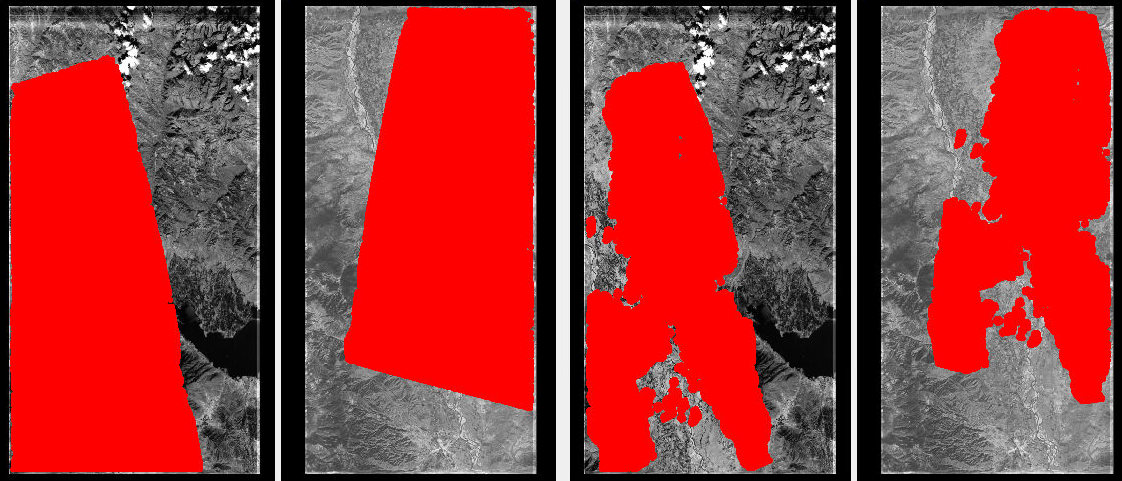
Fig. 16.4 Interest point matches (left, in red) and produced GCP (right), on top of the raw images.
Flat areas do not have GCP. Plotted with stereo_gui (Section 16.71).
Plotted in Fig. 16.4 are the interest point matches and the resulting GCP. Their number is likely excessive here, though the bigger concern is if they are lacking over featureless terrain.
16.18.4. Solving for extrinsics and intrinsics
We employ the recipe from Section 12.2.1.3, that mostly addresses the vertical component of disagreement between the ASP-produced and reference DEMs. The added GCP mostly address the horizontal component.
The most recent bundle-adjusted and aligned cameras can be converted to use the RPC lens distortion model (Section 20.1.2.8) as in Section 16.15. Or, the cameras can be used as is.
If solving for intrinsics and using RPC lens distortion, the small RPC
coefficients must be changed manually to be at least 1e-7 in older builds,
otherwise they will not get optimized. Here, RPC of degree 3 is used. A higher
degree can be employed, either initially, or for subsequent iterations. In the
latest builds this is done automatically by bundle_adjust (option
--min-distortion).
The command when it is desired to refine the intrinsics as well:
bundle_adjust                                 \
  left_image.tif right_image.tif              \
  left_rpc_camera.tsai right_rpc_camera.tsai  \
  --inline-adjustments                        \
  --solve-intrinsics                          \
  --intrinsics-to-float all                   \
  --intrinsics-to-share none                  \
  --num-iterations 100                        \
  --match-files-prefix dense_matches/run      \
  --max-pairwise-matches 10000                \
  --remove-outliers-params '75.0 3.0 100 100' \
  --heights-from-dem ref_dem.tif              \
  --heights-from-dem-uncertainty 250          \
  out.gcp                                     \
  -o ba_rpc_gcp_ht/run
Clean matches are preferable when they do not come from the disparity.
Use --clean-match-files-prefix instead of --match-files-prefix in that
case.
Care must be taken to ensure that GCP are not overwhelmed by other constraints. See Section 16.18.5 for a discussion.
This invocation can be sensitive to inaccurate GCP, as those do not use a robust
cost function. That is why GCP should be produced with clean match files
(Section 16.5.10.1), and the outlier filtering threshold used to create
those clean matches (--remove-outliers-params, Section 16.5.13) should
be no more than 5 to 10 pixels. Consider also using the bundle_adjust option
--max-gcp-reproj-err (Section 16.5.13) to remove worst GCP outliers.
The option --max-disp for dem2gcp can help with this as well.
For linescan cameras, the jitter solver can be invoked instead with a very similar command to the above (Section 16.38).
Examine the pixel residuals before and after bundle adjustment
(Section 16.5.11.5) in stereo_gui as:
stereo_gui --colorbar --min 0 --max 10             \
  ba_rpc_gcp_ht/run-initial_residuals_pointmap.csv \
  ba_rpc_gcp_ht/run-final_residuals_pointmap.csv
It should be rather obvious to see which residuals are from the GCP. These are also flagged in those csv files.
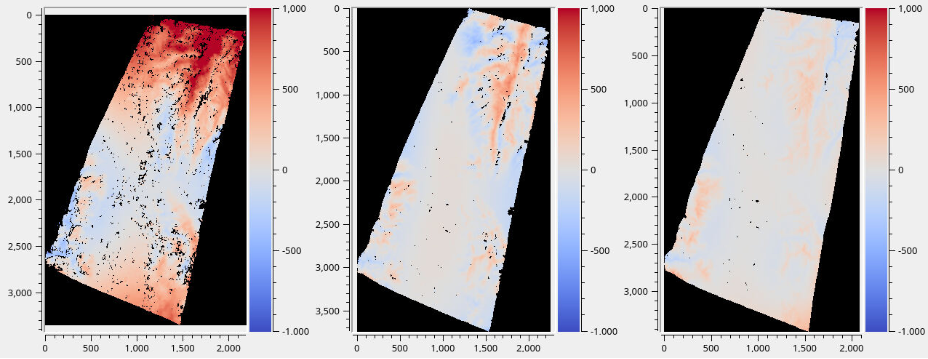
Fig. 16.5 Difference between the ASP DEM and reference DEM. The vertical range is -1000
m to 1000 m. From left-to-right: (a) no distortion modeling (b) modeling
distortion with RPC of degree 3 and optimizing with --heights-from-dem
(c) additionally, use the GCP produced by dem2gcp. The differences are
found with geodiff (Section 16.26) and plotted with stereo_gui.

Fig. 16.6 The unwarped ASP DEM that results in the right-most difference in the above figure (within the green polygon), on top of the reference DEM.
Then, one can rerun stereo with the optimized cameras and the original images
(again with the option --prev-run-prefix, or by doing a new run from
scratch). The results are in Fig. 16.5. The warping is much
reduced but not eliminated.
We further improved the results for KH-7 and KH-9 cameras by creating
linescan cameras (Section 16.8.1.6) and running jitter_solve
with GCP (Section 16.38).
16.18.5. Balancing GCP against other constraints
When using GCP from dem2gcp in bundle_adjust or jitter_solve,
triangulated points that lack GCP are still constrained by
--heights-from-dem or --tri-weight (Section 16.5.13). Both of
these anchor such points to their initial (potentially incorrect) positions. If
these points greatly outnumber the GCP, or have smaller uncertainties than GCP,
they can dominate the solution and prevent the GCP from correcting the cameras.
To avoid this:
Use a smaller value of
--max-pairwise-matchesand check how many triangulated points without GCP have been loaded, vs GCP.Increase
--heights-from-dem-uncertaintyso the DEM constraint is weaker.Use a small value of
--gcp-sigma. It is however suggested not to have this under one GSD.Be aware that
--tri-weighthas the same anchoring effect as--heights-from-demand should be used with the same caution. Though this constraint is usually weak and should not be an issue if triangulated points without GCP are not more than ones with GCP.
16.18.6. Multiple images and cameras
This program can work with multiple images, cameras, and match files, as long as the “warped” DEM is consistent with these datasets. In particular, this DEM can even be produced with Shape-from-Shading (Section 16.67).
The match files can be specified via --match-files-prefix or
--clean-match-files-prefix, in the manner of bundle_adjust
(Section 16.5.10.1).
dem2gcp                                    \
  --warped-dem asp_dem.tif                 \
  --ref-dem ref_dem.tif                    \
  --warped-to-ref-disparity warp/run-F.tif \
  --image-list image_list.txt              \
  --camera-list camera_list.txt            \
  --clean-match-files-prefix matches/run   \
  --max-pairwise-matches 50000             \
  --max-num-gcp 100000                     \
  --gcp-sigma 1.0                          \
  --output-gcp out.gcp
Here, the entries in the camera list are usually after bundle adjustment, and
the matches/run prefix points to the interest point matches, such as
produced by bundle_adjust, or with dense matching (Section 12.2.4.2).
As before, care should be taken that the matches are clean. See Section 16.18.5 for how to ensure GCP are not overwhelmed by other constraints.
The value of --gcp-sigma should be on the order of the ground sample distance
(in meters), to ensure that GCP provide strong constraints in bundle adjustment.
The value in --max-pairwise-matches can be reduced if there is a large number of
pairs of images.
The produced GCP file can then be passed to bundle_adjust or jitter_solve
with the same lists of images, cameras, and match files.
16.18.7. Transforming existing GCP files
Existing GCP files whose ground coordinates were measured on the warped DEM
can be passed in with --input-gcp-list. The argument is a plain text file
with one GCP file path per line. Each triangulated point in these GCP is mapped
through the disparity to the reference DEM (the same transform applied to the
points from interest point matches), and the resulting GCP are appended to the
output GCP file.
In the example below we transform only the input GCP, without generating any
match-derived GCP, by setting --max-pairwise-matches 0. In that case
--match-file, --match-files-prefix, and --clean-match-files-prefix
are not required, and any value set is ignored.
ls warped_gcp1.gcp warped_gcp2.gcp > input_gcp_list.txt

dem2gcp                                    \
  --warped-dem asp_dem.tif                 \
  --ref-dem ref_dem.tif                    \
  --warped-to-ref-disparity warp/run-F.tif \
  --image-list image_list.txt              \
  --camera-list camera_list.txt            \
  --input-gcp-list input_gcp_list.txt      \
  --max-pairwise-matches 0                 \
  --max-num-gcp 100000                     \
  --gcp-sigma 1.0                          \
  --output-gcp out.gcp
The images referenced in the input GCP files must appear in the current image list; otherwise a warning is printed and those measurements are skipped.
Match files and --input-gcp-list can also be used together in a single
invocation; the options --gcp-sigma (or --gcp-sigma-image) and
--max-num-gcp then apply to the combined set of match-derived and input
GCP.
For finer control over weighting, dem2gcp can be invoked twice: once with
match files to produce match-derived GCP (with one --gcp-sigma), and once
with --input-gcp-list and --max-pairwise-matches 0 to transform the
input GCP (with a different --gcp-sigma). Both output files can then be
passed to bundle_adjust (Section 16.5) or jitter_solve
(Section 16.38).
16.18.8. Command-line options
- --warped-dem <string (default: “”)>
The DEM file produced by stereo, that may have warping due to unmodeled distortion.
- --ref-dem <string (default: “”)>
The reference DEM file, which is assumed to be accurate.
- --warped-to-ref-disparity <string (default: “”)>
The stereo disparity from the warped DEM to the reference DEM (use the first band of the hillshaded DEMs as the inputs for the disparity).
- --left-image <string (default: “”)>
The left raw image that produced the warped DEM.
- --right-image <string (default: “”)>
The right raw image that produced the warped DEM.
- --left-camera <string (default: “”)>
The left camera that was used for stereo.
- --right-camera <string (default: “”)>
The right camera that was used for stereo.
- --match-file <string (default: “”)>
The match file between the left and right raw images.
- --image-list <string (default: “”)>
A file containing the list of images, when they are too many to specify on the command line. Use space or newline as separator. See also
--camera-list.- --camera-list <string (default: “”)>
A file containing the list of cameras, when they are too many to specify on the command line. If the images have embedded camera information, such as for ISIS, this file may be omitted, or specify the image names instead of camera names.
- --match-files-prefix <string (default: “”)>
Use the match files with this prefix.
- --clean-match-files-prefix <string (default: “”)>
Use as input
*-clean.matchfiles with this prefix.- --max-pairwise-matches <int (default: -1)>
If positive, reduce the number of matches to load from any given match file to at most this value.
- --gcp-sigma <double (default: 1.0)>
The sigma to use for the GCP points. A smaller value will give to GCP more weight. This should be a fraction of the image ground sample distance. Measured in meters. See also
--gcp-sigma-image.- --output-gcp <string (default: “”)>
The produced GCP file with ground coordinates from the reference DEM.
- --max-num-gcp <int (default: -1)>
The maximum number of GCP to write. If negative, all GCP are written. If more than this number, a random subset will be picked. The same subset will be selected if this program is called again.
- --max-disp <double (default: -1.0)>
If positive, flag a disparity whose norm is larger than this as erroneous and do not use it for creating GCP. Measured in pixels. See also option
--max-gcp-reproj-errinbundle_adjust(Section 16.5.13).- --gcp-sigma-image <string (default: “”)>
Given a georeferenced image with float values, for each GCP find its location in this image and closest pixel value. Let the GCP sigma be that value. Skip GCP that result in values that are no-data or are not positive. This overrides
--gcp-sigma.- --search-len <int (default: 0)>
How many DEM pixels to search around to find a valid DEM disparity (pick the closest). This may help with a spotty disparity but should not be overused.
- --input-gcp-list <string (default: “”)>
A file containing a list of existing GCP files (one per line), with ground coordinates measured on the warped DEM. Each triangulated point is mapped via the disparity to the reference DEM, and the resulting GCP are appended to the output GCP file. The options
--gcp-sigmaand--max-num-gcpapply to the combined set. A warning is issued for images referenced by the input GCP that are not in the image list.- -v, --version
Display the version of software.
- -h, --help
Display this help message.